










Abrir menú de accesibilidad Ir al contenido de la página

Win subscribers with a standout YouTube banner

Give your channel a header that looks right on phones, laptops, and TVs. Pick from 42,130+ YouTube channel art templates, drop in your logo, and download in minutes.

Win subscribers with a standout YouTube banner

Give your channel a header that looks right on phones, laptops, and TVs. Pick from 42,130+ YouTube channel art templates, drop in your logo, and download in minutes.
Win subscribers with a standout YouTube banner Win subscribers with a standout YouTube banner

Desbloquee un marketing más inteligente y con la tecnología de IA gracias a PosterMyWall Premium.

Todo lo que necesita para promocionar su negocio

Make your youtube channel stand out

YouTube wants your banner at 2560 x 1440 pixels, and every screen shows a different slice of it. Keep your channel name and logo inside the centered 1546 x 423 safe area, and nothing important gets cropped on a phone. Every design in our YouTube channel art templates gallery is already built to that size, so you skip the guesswork.

Effortless customization for creators

No design experience? No problem. Our platform offers millions of stock images, videos, and audio to choose from. Instantly resize your designs for free, ensuring your YouTube channel art looks perfect on any device. Elevate your channel's visual appeal and engage your audience with professional results, all without the hassle.

Start with a prompt or a template

Describe your channel and Create with AI builds the banner for you. Or pick a ready YouTube banner template and swap in your text. Both paths open the same editor, where you can generate a background with AI Images, drop in your own photos, and change fonts and colors until it feels like your channel.

Keep your whole channel looking like you

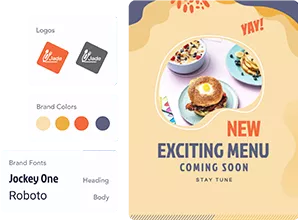
A banner works hardest when your thumbnails, posts, and profile all match it. Save your logo, colors, and fonts in Brand Kits and apply them in two clicks. Then resize the same artwork into YouTube thumbnail templates and social posts, and schedule them to YouTube without leaving the app. One look, everywhere your channel shows up.

¿Por qué utilizar PosterMyWall?

How to make YouTube channel art

  1. Empiece GRATIS

    Abra PosterMyWall en su ordenador de escritorio, móvil o tableta para comenzar de forma gratuita.

  2. Elija una plantilla de diseño

    Elija entre miles de plantillas diseñadas profesionalmente para cualquier negocio, evento u ocasión.

  3. Personalice su plantilla con herramientas sencillas

    Añada su logotipo, images, vídeos, fuentes, adhesivos, clips de audio y mucho más. Utilice Kits de marca para diseños coherentes y acordes con la marca.

  4. Descargue su diseño

    Download for free or purchase high-res files. Upgrade to PosterMyWall Premium plans for unlimited high quality image and video downloads, plus the full AI suite.

  5. Comparta en cualquier momento y lugar

    Publique en Facebook, X (Twitter), Instagram, o envíe mediante campañas de correo electrónico, incruste en sitios web o muestre en pantallas digitales.

Plataforma de marketing todo en uno con tecnología de IA

Cree, comparta y rastree en un solo lugar

El marketing fácil comienza aquí

Marketing sencillo en redes sociales

  • ¡Cree videos de moda para redes sociales con Cronología y Subtítulos de IA, y comparta!
  • Genere subtítulos rápidamente con nuestro Escritor de IA: se acabó el bloqueo del escritor.
  • Publique publicaciones e historias en todas las redes sociales con un solo clic. ¡Su alcance nunca ha sido mayor!
  • Programe publicaciones para todas sus redes sociales con anticipación. Solo configure y olvídese.
  • Cree videos con Cronología y Subtítulos de IA.
  • Genere títulos rápidamente con nuestro Escritor de IA: se acabó el bloqueo del escritor.
  • Publique publicaciones e historias en todas las redes sociales con un solo clic.
  • Programe publicaciones para todas sus redes sociales con anticipación. Configure y olvídese.
El marketing fácil comienza aquí

Correos electrónicos sin código para usuarios sin conocimientos de programación

  • Elija entre más de 3600 plantillas de correo electrónico diseñadas profesionalmente.
  • Personalice con plantillas de sección, estilos, etiquetas de combinación y más.
  • Envíe hasta 10 000 correos electrónicos cada mes.
  • Cree formularios de registro por correo electrónico para hacer crecer sus listas.
El marketing fácil comienza aquí

Diseñe con herramientas sencillas

  • Desbloquee descargas ilimitadas de imágenes y vídeos en alta resolución
  • Cree fotos atractivas de sus productos con Eliminador de fondos con IA.
  • Convierta su imaginación en realidad con Imágenes de IA.
  • Consiga una imagen de marca coherente rápidamente con Kits de marca.
  • Desbloquee descargas ilimitadas de imágenes y vídeos en alta resolución.
  • Cree fotos atractivas de sus productos con Eliminador de fondos con IA.
  • Convierta su imaginación en realidad con Imágenes de IA.
  • Consiga una imagen de marca coherente rápidamente con Kits de marca y fuentes personalizadas.
El marketing fácil comienza aquí

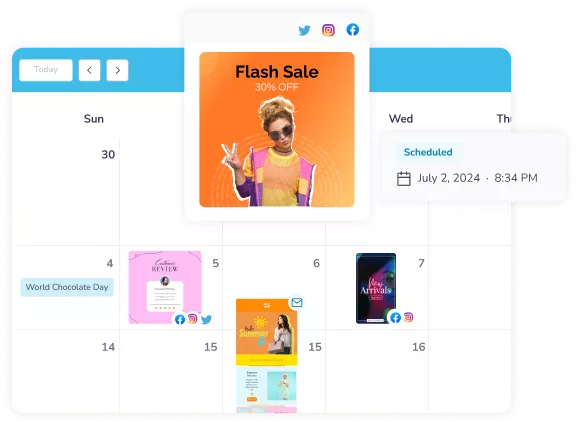
Optimice su calendario de marketing

  • Programe publicaciones en redes sociales y correos electrónicos para más tarde.
  • Planifique campañas en un solo calendario y manténgase al día.
  • No se pierda otra oportunidad de marketing.
  • Programe publicaciones y correos electrónicos para más tarde.
  • Planifique campañas en un solo calendario y manténgase al día.
  • No se pierda otra oportunidad de marketing.
El marketing fácil comienza aquí

Genere expectación para su próximo evento

  • Atraiga multitudes con páginas de eventos personalizadas ilimitadas.
  • Elabore interesantes descripciones de eventos con Escritor de IA.
  • Publique su evento en todas las redes sociales al instante.
  • Promocione su evento con correos electrónicos listos para enviar.
  • Atraiga multitudes con páginas de eventos personalizadas ilimitadas.
  • Redacte descripciones de eventos emocionantes con Escritor de IA.
  • Publique su evento en todas las redes sociales al instante.
  • Promocione su evento con correos electrónicos listos para enviar.
El marketing fácil comienza aquí

Marketing más inteligente con IA

Explore más plantillas de diseño

Preguntas más frecuentes

What size should a YouTube banner be?

The recommended YouTube banner size is 2560 x 1440 pixels, saved as a JPG or PNG under 6MB. YouTube accepts a minimum of 2048 x 1152 pixels, but the larger file stays sharp on TV screens. Every channel art template on PosterMyWall is already set to 2560 x 1440.

What is the YouTube channel art safe area?

The YouTube channel art safe area is the centered 1546 x 423 pixel strip that shows on every device. Keep your channel name, logo, and tagline inside it, and treat the space around it as background. PosterMyWall templates place the key text inside that strip for you.

Why does my YouTube banner look cropped on mobile?

Your banner looks cropped on mobile because YouTube shows only the middle slice of your 2560 x 1440 image on small screens. Text near the top, bottom, or outer edges disappears. Move everything you need people to read into the centered 1546 x 423 safe area and it will show up everywhere.

Can I make a free YouTube banner?

Yes, you can make a free YouTube banner on PosterMyWall. Open a channel art template, customize the text, colors, and photos, then download it at no cost. A free account covers the editor and the template library. PosterMyWall Premium plans add unlimited high-resolution downloads and the full AI suite.

What is the difference between YouTube channel art and a YouTube banner?

YouTube channel art and a YouTube banner are two names for the same image, the wide graphic across the top of your channel page. Some people call it a channel header or cover photo instead. All of them use the same 2560 x 1440 pixel size and the same safe area.

How do I upload a banner to my YouTube channel?

To add your banner, open YouTube Studio, go to Customization, then Branding, and upload your image under Banner image. YouTube shows a preview across TV, desktop, and mobile before you publish. Download your finished design from PosterMyWall as a JPG or PNG and upload it there.

Can AI make a YouTube banner background?

Yes, describe the look you want and PosterMyWall AI builds a banner background for you, ready to edit. You can also generate a custom image with AI Images and place it behind your channel name. Both options open in the same editor as the ready-made templates.

Are there gaming YouTube banner templates?

Yes, PosterMyWall has gaming YouTube banner templates alongside vlog, music, fitness, beauty, cooking, and travel designs. Search the channel art gallery by your topic, then change the colors and fonts to match your channel. You can also drop in your own screenshots and logo.

Can I make a YouTube banner on my phone?

Yes, PosterMyWall works in any browser and in the free iOS and Android apps, so you can design a banner on your phone or tablet. Your work syncs across devices, which means you can start a design on your laptop and finish it on your phone.

How often should I update my channel banner?

Refresh your channel banner every few months, or whenever your content focus, upload schedule, or branding changes. Seasonal promotions and new series are good reasons too. Duplicate your existing design in PosterMyWall, change the artwork and text, then upload the new version in a couple of minutes.

Comparar PosterMyWall






